
Thinking about upgrading your car’s infotainment screen? You’ve probably come across two options — Android monitors and Linux monitors. They may look similar on the outside, but the OS underneath makes a world of difference. Let’s break it all down.
1️⃣ Boot Speed — Linux Is Ready Before You Buckle Up
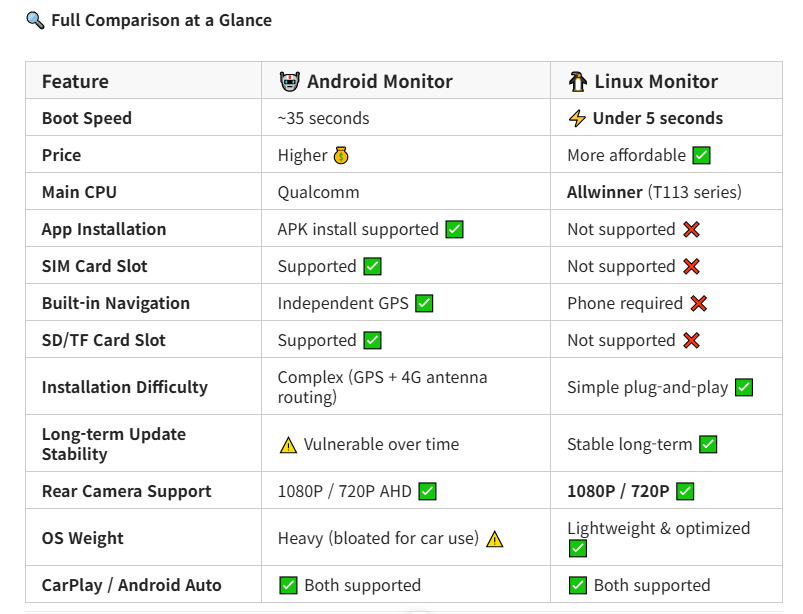
The moment you start your engine, a Linux monitor is ready in under 5 seconds. CarPlay or Android Auto connects almost instantly — no waiting, no staring at a loading screen.
An Android monitor takes approximately 35 seconds to fully boot. That’s because Android needs to initialize its entire OS stack — background services, app frameworks, runtime environments — all before you can do anything.
💡 Why the gap? Linux is a purpose-built, stripped-down OS designed specifically to handle CarPlay, Android Auto, and video playback. Android, by contrast, carries the full weight of a smartphone ecosystem onto your dashboard. In a car, that overhead is completely unnecessary.
2️⃣ The CPU: Allwinner vs Qualcomm
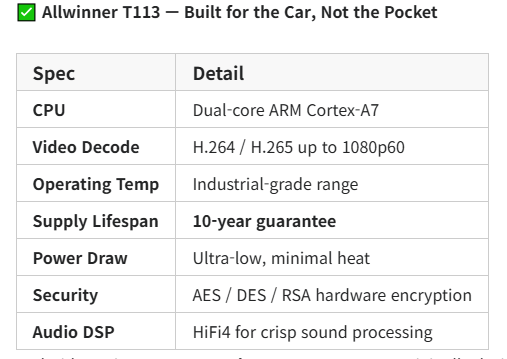
Linux car monitors use Allwinner chips — most commonly the Allwinner T113 series. These are not budget chips. They are purpose-engineered automotive and industrial-grade SoCs built for exactly this kind of environment.
Android monitors run on Qualcomm processors — originally designed for smartphones. While they’re powerful, they bring smartphone-level power consumption and heat generation into an environment that simply doesn’t need it.
The Allwinner T113’s 10-year supply guarantee is especially significant. Cars aren’t phones — you keep them for a decade or more. A chip designed with that lifespan in mind is the right tool for the job. CNX Software
3️⃣ App Installation — Android’s Big Advantage (With a Catch)
This is where Android monitors genuinely shine:
- ✅ Install YouTube, Netflix, Spotify, and other streaming apps directly via APK
- ✅ Use Google Play Store (on supported units)
- ✅ Run navigation apps like Google Maps or Waze independently, no phone needed
- ✅ Access 4G LTE internet via built-in SIM card slot
- ✅ Expand storage with SD/TF card slots
Linux monitors cannot install apps at all. All app functionality goes through CarPlay or Android Auto via your smartphone. If your phone is dead or disconnected, the Linux screen’s functionality is limited to basic media and OEM features.
But here’s the catch with Android: Those apps and the OS itself age. We’ll cover this in detail in Section 5 — it’s the most important thing to understand before buying.
4️⃣ Rear Camera — Both Support 1080P
One common misconception is that Linux monitors only support 720P rear cameras. That’s not accurate.
| Camera Resolution | Android Monitor | Linux Monitor |
|---|---|---|
| 1080P AHD | ✅ Supported | ✅ Supported |
| 720P AHD | ✅ Supported | ✅ Supported |
| CVBS | ✅ Supported | ✅ Supported |
Both monitor types support full 1080P high-definition rear cameras. This is an important correction to a widely spread misconception online.
5️⃣ 🚗 Why Don’t Car Manufacturers Use Android OS? (The Most Important Section)
This is the question most buyers never think to ask — but it’s the key to understanding which monitor is truly right for your car.
❶ Android Is Bloated — Far Too Heavy for a Car
Android was built for smartphones. It was designed to run social media, games, dozens of background services, and a constantly evolving app ecosystem simultaneously. When you transplant that OS into a car dashboard, the vast majority of its features become dead weight.
Think about it: in your car, you need CarPlay, video playback, and navigation. That’s it. Android forces the hardware to initialize and maintain an entire smartphone OS just to do those three things. It’s like hiring a team of 50 engineers when you only need one.
“It feels like someone just bolted a smartphone onto the dashboard and called it an infotainment system.” — A common sentiment from automotive engineers and enthusiasts alike.
Real-world consequences of Android’s bloat in vehicles include:
- 🐢 Instrument cluster display freezing mid-drive
- 🔇 Full system resets needed to restore audio (including turn signal sounds)
- 📷 Rearview camera struggling to load while reversing
- 📵 Phone key (digital car key) failing to respond
“Vehicle launches were delayed to resolve software issues, and I still experienced bugs while driving… instrument display freezing, phone key not responding…” — Real user report Reddit
❷ The Update Problem — Android Ages Badly in Cars
This is the single biggest reason Android is a poor fit for vehicles.
Smartphones get replaced every 2–3 years. Cars last 10–15 years. Android OS versions follow Google’s support policy — after a certain period, older versions stop receiving security patches, and apps begin requiring newer OS versions to function.
Here’s what that means for an Android car monitor over time:
| Timeline | What Happens |
|---|---|
| Year 1–2 | Everything works great ✅ |
| Year 3–4 | Some apps stop updating for your Android version ⚠️ |
| Year 5–6 | Security patches end, apps break, system slows down ❌ |
| Year 7+ | System is effectively obsolete — can’t update, can’t fix 🚫 |
“I would never buy a car without CarPlay. The software will inevitably get too slow due to updates, and buying a new phone is easier than buying a new car.” — Reddit user Reddit
Linux monitors don’t have this problem. The OS is minimal, self-contained, and doesn’t depend on an external corporation’s update policy. It does its job on day 1 and day 3,650 equally well.
❸ Loss of Manufacturer Control
When automakers embed Android OS, they hand control of the core user experience to Google. Vehicle data, usage patterns, and in-car behavior become tied to a third-party tech giant’s platform policies.
This is precisely why most premium automakers — BMW, Mercedes, Toyota, Hyundai — build their own proprietary OS layers rather than adopting Android wholesale. The few that have adopted Android Automotive (like Volvo and Polestar) have experienced recurring stability issues and user complaints.
6️⃣ What They Both Do Equally Well
Despite their differences, both monitor types share these core capabilities:
| Shared Feature | Description |
|---|---|
| 📱 CarPlay & Android Auto | Wired AND wireless supported on both |
| 🔄 Dual System Switching | Quick toggle between OEM and aftermarket system |
| 📷 OEM Rear Camera & Radar | Original factory camera/radar display supported |
| 🖥️ Touchscreen Specs | Same screen sizes and resolution options |
| 🎵 Media Playback | Audio and video playback on both |
🎯 Which Monitor Should You Choose?
🤖 Choose Android If…
- ✔️ You want to run apps directly without connecting your phone
- ✔️ You use YouTube, Netflix, or streaming apps in your car regularly
- ✔️ You need independent GPS navigation without your phone
- ✔️ You want built-in 4G LTE internet via SIM card
- ✔️ You don’t mind managing updates and potential aging issues
- ✔️ You plan to upgrade your car within 5 years
🐧 Choose Linux If…
- ✔️ You primarily use CarPlay or Android Auto (the majority of users)
- ✔️ Fast boot speed and rock-solid stability are your priority
- ✔️ You want a set-it-and-forget-it solution with zero maintenance
- ✔️ You’re keeping your car for 10+ years
- ✔️ You want a simpler, cleaner install (no extra antenna routing)
- ✔️ You want the best value for money
📝 Final Verdict
Both Android and Linux monitors have their place — but for the majority of car users who primarily use CarPlay or Android Auto, the Linux monitor is the smarter, more practical choice.
It boots faster. It runs cleaner. It doesn’t get weighed down by updates. And it’ll work just as well on day one as it does a decade later. A car is not a smartphone. It deserves an OS built for the road, not the app store.
That said, if you live without your phone in the car and want full app access, Android delivers features Linux simply can’t match. Know your needs — and choose accordingly.